Medical Practice Website Launch & Conversion Checklist
A practical, patient-centered checklist for independent medical practices preparing to launch a website or evaluate a major redesign.
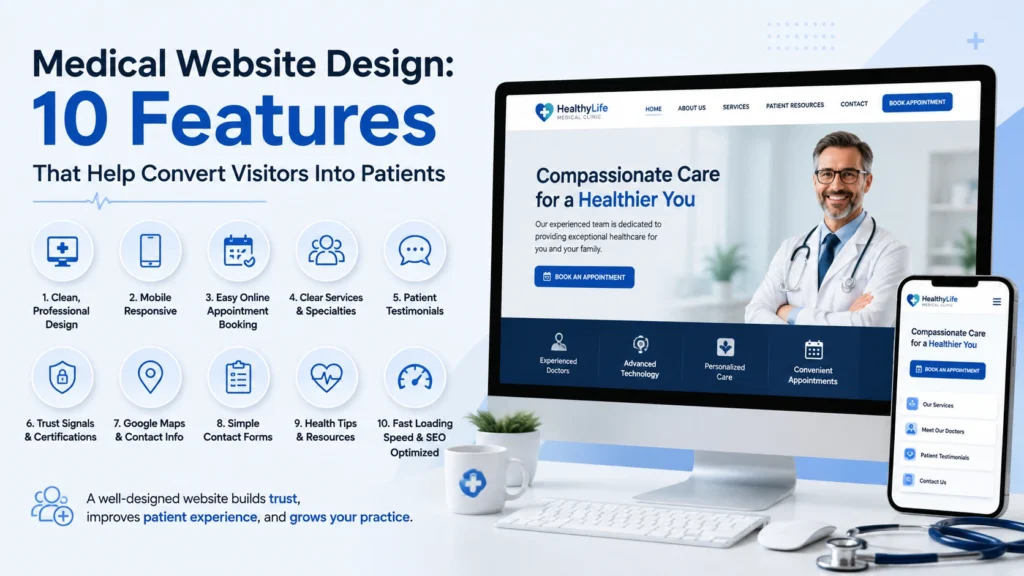
A medical practice website should help patients understand the practice, decide whether its services fit their needs, and request the next step. It should also give the practice reliable information about whether contact paths and marketing systems are working. This checklist is for independent medical practices, clinic owners, and practice managers preparing to launch a website or evaluate a major redesign.
Use it as a working document with your web developer, marketing partner, office manager, and compliance adviser. Assign an owner and a due date to every item. Requirements involving protected health information, accessibility, consent, or record retention should be reviewed with qualified legal and compliance professionals for your organization and jurisdiction.
1. Confirm ownership, scope, and launch responsibilities
A smooth launch starts with clear ownership. The practice should control its domain, hosting account, analytics properties, Search Console property, business listings, and advertising accounts. Vendors can receive appropriate access without becoming the sole owner of these assets.
- Document the primary goal of the website, such as appointment requests, phone calls, or service discovery.
- List every service, provider, office location, and patient type that must be represented at launch.
- Name the person who will approve medical claims, service descriptions, insurance information, and provider biographies.
- Confirm that the practice owns the domain registration and knows when it renews.
- Record who controls hosting, DNS, email delivery, Google Business Profile, GA4, Google Tag Manager, and Search Console.
- Create a written backup and rollback plan before DNS, theme, plugin, or production content changes.
- Decide who will monitor the site during the first week after launch and who is authorized to approve urgent fixes.
2. Test mobile usability and accessibility
Many patients first encounter a practice on a phone while looking for an address, a service, or an appointment. Mobile testing should therefore use real devices as well as browser previews. Accessibility should be treated as a practical quality requirement throughout the build, not as a final plugin or overlay.
Mobile usability
- Confirm that navigation, service menus, forms, and appointment buttons work at common phone and tablet widths.
- Keep the practice name, phone number, location, and primary appointment action easy to find.
- Make tap targets large enough to use comfortably and leave sufficient spacing between adjacent links.
- Ensure phone numbers use click-to-call links and addresses open the intended map destination.
- Check that forms do not trigger unexpected zooming, horizontal scrolling, or fields hidden behind a keyboard.
- Review sticky headers and mobile call buttons so they do not cover consent text, error messages, or form controls.
Accessibility fundamentals
- Use a logical heading order, with one descriptive H1 and clearly nested H2 and H3 headings.
- Provide meaningful alternative text for informative images and empty alternative text for decorative images.
- Verify sufficient color contrast for text, buttons, links, form labels, placeholders, alerts, and success messages.
- Make the full page usable with a keyboard and keep the focus indicator visible.
- Associate every form field with a clear label. Do not rely on placeholder text as the only label.
- Present validation errors next to the affected field and make the error understandable without color alone.
- Test zoom at 200 percent and confirm that important content and controls remain available.
- Respect reduced-motion preferences and avoid animation that interferes with reading or navigation.
3. Make service and location information clear
Patients should be able to answer three questions quickly: What does the practice provide? Is the service relevant to me? How do I request the next step? A service page should support those decisions without making promises that the practice cannot substantiate.
- Create a dedicated, useful page for each core service rather than placing every service in one short list.
- Explain who the service may be for, what patients can expect, and when they should contact the office.
- Use language that patients understand while preserving medically accurate terminology where it matters.
- Keep provider names, credentials, office hours, accepted insurance information, and location details current.
- State the geographic service area naturally. Avoid repetitive city lists that make the page difficult to read.
- Link related services where the connection helps a patient navigate, not simply to increase link counts.
- Review every testimonial, credential, award, and outcome statement for accuracy and documented permission.
- Remove draft filler, outdated offers, unsupported superlatives, and claims that cannot be verified.
4. Build clear appointment-request pathways
The primary call to action should match the practice’s real intake workflow. If a form sends a request for staff follow-up, label it as an appointment request rather than promising an instantly confirmed appointment.
- Choose one primary action label and use it consistently in the header, service pages, and contact area.
- Keep a phone option available for patients who prefer to call or need a more immediate response.
- Place the main action after useful service information as well as in a predictable navigation location.
- Explain what happens after a request is submitted and the expected response window.
- Provide an alternative path if the online scheduler or form is temporarily unavailable.
- Do not present a general website form as an emergency communication channel.
- Use clear language directing urgent or emergency concerns to the appropriate emergency resource.
- Test scheduling links for the correct provider, location, appointment type, and timezone.
5. Verify contact-form reliability from end to end
A form is only successful when a genuine inquiry can be submitted, stored or logged as intended, delivered to the correct team, and acknowledged clearly for the patient. A visual confirmation alone does not prove that the office received the message.
- Keep fields limited to information genuinely needed for the initial request.
- Confirm required fields, labels, consent text, validation messages, and the submission button are readable on every device.
- Test AJAX behavior, loading states, duplicate-click prevention, and the success confirmation.
- Submit test inquiries on desktop, tablet, and mobile, including a private or incognito session.
- Verify that each test is recorded in the intended form-entry log when entry storage is enabled.
- Confirm delivery to the monitored business inbox and check spam or quarantine folders.
- Configure authenticated email delivery and verify SPF, DKIM, and DMARC alignment with the practice’s email provider.
- Enable proportionate anti-spam protection and review spam logs for false positives.
- Use rate limiting where appropriate without blocking legitimate patients or broad geographic regions by default.
- Check that caching, script delay, and performance optimization do not postpone required form dependencies.
- Make the confirmation message visually distinct, readable, and specific about the next step.
- Create a recurring test schedule so form delivery is checked after plugin, theme, DNS, or email changes.
6. Measure calls and confirmed form leads correctly
Conversion tracking should describe what actually happened. A click on a phone link is an intent signal, not proof that a call connected. A form lead should be recorded only after the form confirms a successful server-side submission.
For budget planning, use the Medical Practice Google Ads Budget & Lead Calculator to model clicks, inquiries, qualified leads, and booked appointments from assumptions entered by your practice.
- Audit the site for duplicate GA4 and Google Tag Manager installations before adding new tags.
- Use a single, documented data layer event or equivalent success signal for confirmed form submissions.
- Send a
generate_leadevent only after the success response, not on button clicks or validation attempts. - Prevent the event from firing twice when the confirmation is rendered, the page history changes, or the user clicks repeatedly.
- Track telephone-link interactions separately with an event such as
click_to_call. - Do not label every phone-link click as a completed call or qualified lead.
- Never send names, email addresses, telephone numbers, message text, appointment details, or other personal information to GA4.
- Use GTM Preview and GA4 DebugView to verify event names, parameters, trigger conditions, and duplicate prevention.
- Mark only the intended confirmed lead event as a GA4 key event.
- Document the test date, form ID, tag version, and expected result for future troubleshooting.
7. Establish local SEO foundations
Local visibility depends on consistent business information, useful location content, a technically accessible site, and a maintained Google Business Profile. A sound approach to SEO for doctors and medical practices does not require dozens of thin city pages or repetitive keyword variations.
- Use the practice’s real name, address, and phone number consistently across the website and major profiles.
- Verify the Google Business Profile owner, primary category, secondary categories, hours, appointment link, and website URL.
- Create a useful location page for each staffed office with original directions, parking or access information, hours, and services.
- Write unique SEO titles and meta descriptions that accurately reflect each page.
- Use descriptive internal links between services, provider pages, locations, and helpful patient resources.
- Add appropriate organization, location, provider, and service structured data only when the visible page supports it.
- Check canonical URLs, indexing directives, XML sitemap inclusion, and redirects for every launch URL.
- Remove links to deleted pages and use a relevant 301 redirect only when a genuine replacement exists.
- Review local citations for stale addresses, tracking numbers, duplicate profiles, and inconsistent names.
- Build review-request and response procedures that respect platform policies and patient privacy.
8. Configure Search Console and GA4
Google Search Console
- Verify a domain property under an account owned by the practice.
- Submit the canonical XML sitemap and confirm it returns a valid response.
- Inspect representative home, service, provider, and location URLs after launch.
- Review Page indexing, Core Web Vitals, HTTPS, security issues, manual actions, and relevant rich-result reports.
- Record baseline clicks, impressions, click-through rate, average position, and landing pages before major changes.
- Separate branded from non-branded query reporting so growth is interpreted accurately.
Google Analytics 4
- Confirm the correct GA4 property and web data stream are owned by the practice.
- Check that one page view is recorded per page load and that internal or staging traffic is handled as planned.
- Configure only necessary events and document which ones are treated as key events.
- Verify cross-domain behavior if scheduling, payment, or portal steps occur on a separate approved domain.
- Set a data-retention and access policy appropriate for the organization’s needs.
- Link Search Console to the correct GA4 property after ownership and permissions are confirmed.
9. Address practical security and privacy requirements
Security and privacy decisions should reflect the specific information the practice collects and the systems that receive it. A marketing site should collect as little sensitive information as practical. If a workflow involves protected health information, confirm the hosting, form, email, scheduling, analytics, and vendor arrangements with the practice’s compliance professionals.
This checklist is operational guidance, not a determination that a website complies with HIPAA, state privacy law, accessibility law, or any payer or professional requirement.
- Enforce HTTPS and verify that all internal assets, forms, and redirects use secure destinations.
- Use unique accounts, strong passwords, multifactor authentication, and least-privilege access.
- Remove former vendors and staff promptly, and review administrator access on a regular schedule.
- Maintain tested backups with a documented restore process and an encrypted, access-controlled off-site copy where appropriate.
- Apply WordPress core, theme, and plugin updates through a controlled process with verification.
- Remove unused themes, plugins, accounts, forms, API keys, and integrations.
- Publish accurate privacy, cookie, accessibility, and terms information appropriate to the practice.
- Do not place personal or health information in page URLs, analytics parameters, advertising audiences, or debugging tools.
- Review business associate agreements and vendor contracts where a service may create, receive, maintain, or transmit protected health information.
- Create an incident-response contact list covering the practice, host, developer, email provider, and relevant vendors.
10. Improve speed without breaking essential functions
Performance work should improve the patient experience while preserving forms, navigation, consent controls, and tracking. Global script delay or aggressive caching can make a fast-looking page unreliable if it postpones a form dependency or serves outdated content.
- Measure representative pages on mobile and desktop before optimization.
- Review Largest Contentful Paint, Interaction to Next Paint, and Cumulative Layout Shift in field and lab data.
- Resize and compress images, use modern formats where supported, and avoid loading oversized media.
- Preload only critical assets and limit unnecessary fonts, font weights, scripts, and third-party widgets.
- Configure page caching and CDN behavior with targeted exclusions for forms, logged-in users, previews, and dynamic endpoints.
- Test menus, forms, tracking, scheduling links, consent tools, and embedded maps after every optimization change.
- Prevent layout shifts by reserving space for images, embeds, banners, and dynamic confirmation messages.
- Clear the relevant application, page, object, and CDN caches after a verified production change.
11. Complete pre-launch quality assurance
Content and navigation
- Proofread page titles, headings, services, provider credentials, office hours, addresses, phone numbers, and policies.
- Test every navigation item, button, phone link, email link, map link, download, and external destination.
- Confirm that the primary call to action is consistent and that no draft or placeholder content remains.
- Review the site on current versions of major browsers and on real iOS and Android devices.
Search and technical checks
- Confirm production pages do not inherit staging noindex directives or password protection.
- Validate robots.txt, the XML sitemap, canonical tags, status codes, and relevant structured data.
- Check redirects for loops and chains, and confirm deleted URLs return an intentional 404, 410, or relevant 301.
- Verify that staging domains, temporary hostnames, and duplicate protocol or hostname variants are not indexable.
- Run a crawl to identify broken links, orphan pages, missing titles, duplicate headings, and inaccessible assets.
Forms, email, and analytics
- Complete a genuine test submission from outside the office network and verify the stored entry, notification, and confirmation.
- Test anti-spam handling with normal language and confirm the inquiry is not rejected or silently filtered.
- Use GTM Preview and GA4 DebugView to confirm one successful form event and separate phone-link events.
- Verify that no personal information appears in analytics events, URLs, browser console output, or tag-debug data.
- Record a launch-day baseline and annotate the deployment date for later reporting.
Launch and rollback
- Create and verify a final backup immediately before deployment.
- Lower DNS time-to-live in advance only when a DNS change is planned and restore it afterward.
- Schedule the launch when the responsible practice and technical contacts are available.
- Keep the rollback steps, credentials, and most recent backup accessible to the authorized launch team.
- Monitor forms, uptime, email delivery, indexing, analytics, server errors, and patient-facing functions after release.
12. Review the website after launch
Launch is the start of measurement, not the end of the project. Review the site after the first 24 hours, again after one week, and then monthly. Early checks should prioritize patient access and data quality before ranking movement or conversion-rate interpretation.
- Re-test the primary form, phone links, scheduling links, and directions.
- Review form spam logs and email delivery for rejected or delayed genuine inquiries.
- Check Search Console indexing and sitemap processing for the launched URLs.
- Compare GA4 and tag-debug results with the documented implementation.
- Review site speed and error logs for issues that appeared only under real traffic.
- Collect questions from front-desk staff and patients to identify unclear service or intake information.
- Create a maintenance calendar for content reviews, software updates, backups, form tests, access reviews, and reporting.
Master launch sign-off
Before approving launch, the practice owner or authorized manager should be able to sign off on each of these outcomes:
- The practice controls its essential accounts and has a current access record.
- Service, provider, location, and contact information is accurate.
- The website is usable on mobile devices and supports keyboard and zoom use.
- The appointment pathway describes the real intake process.
- A genuine form test was stored, delivered, and confirmed successfully.
- Call clicks and confirmed form submissions are measured separately and without personal information.
- The production site is indexable, canonical, included in a valid sitemap, and connected to Search Console.
- GA4 records one clean implementation with documented key events.
- Backups, security access, software updates, and privacy responsibilities have named owners.
- The launch team has completed browser, device, link, form, analytics, accessibility, speed, and rollback checks.
Related example: The La Vista Medical Center website and SEO case study shows how healthcare website development, local search foundations, and patient contact paths can be combined in one project scope. It intentionally avoids unverified performance claims.
Planning note: Practices that need help translating this checklist into a project scope can review Pacific Digital’s healthcare website design service. The checklist remains useful whether a practice works with Pacific Digital, another qualified partner, or an internal team.